
How to Setup Subscriptions and Recurring Invoices in Odoo
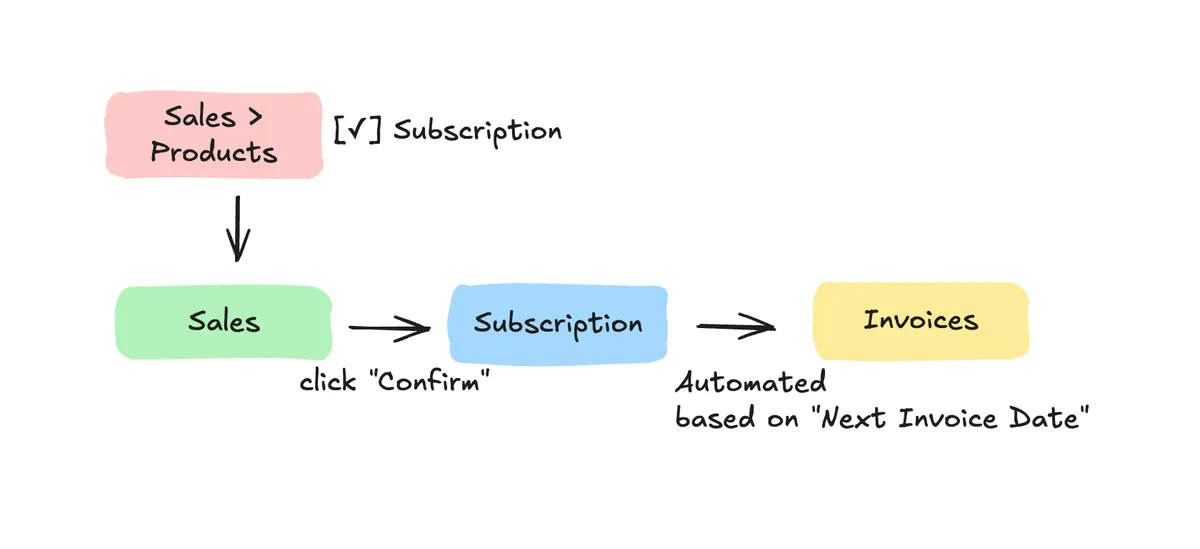
How to Setup Subscriptions and Recurring Invoices in Odoo
There are various business that relies on a monthly, quarterly, semi-annual (or 6 months) and yearly recurring invoices. The list may include:
- Security or CCTV companies making sure the security equipments are functioning all time, thus a maintenance and routine check every quarter
- Pest control services to make sure their F&B customers are fully compliant to Malaysia’s Ministry of Health (MOH) regulations
- Software companies like us to provide regular annual services to support our customers
The pain in the such companies that requires regular invoicing that is done manually based on an excel , invoices can be easily missed. In Odoo you can setup a scheduled Subscription that can allow you to monitor and automatically invoice your customers, do it once and done
Introduction to Barcode Scanning in Odoo
Barcode scanning is a powerful tool that simplifies inventory management by automating tasks such as tracking stock levels, managing orders, and processing returns. Odoo’s barcode scanning feature is designed to streamline these processes, ensuring that businesses can operate more efficiently and effectively. Whether you are using Odoo 17 or the latest Odoo 18, the benefits of barcode integration are substantial.
Advantages of Barcode Scanning in Odoo
1. Enhanced Accuracy and Error Reduction
One of the primary advantages of using barcode scanning in Odoo is the significant reduction in errors. Manual data entry is prone to mistakes such as incorrect quantities or product mismatches, which can lead to stock discrepancies and customer dissatisfaction. By scanning barcodes, businesses can ensure that products are accurately identified and tracked, minimizing the risk of human error. This accuracy not only improves inventory management but also enhances customer satisfaction by ensuring timely and correct deliveries.
For instance, a leading online retailer experienced a 40% boost in productivity by implementing Odoo’s barcode scanning, which streamlined their inventory management and reduced errors significantly.
2. Real-Time Tracking and Visibility
Barcode scanning provides real-time visibility into inventory movements, allowing businesses to monitor stock levels and track items as they move through the supply chain. This real-time data enables companies to make informed decisions promptly, optimize stock levels, and respond swiftly to changing market demands. With Odoo, businesses can access these insights via mobile devices, ensuring that inventory management is always at their fingertips.
3. Enhanced Productivity and Time Savings
Implementing barcode scanning in Odoo significantly enhances productivity by accelerating the inventory management process. Scanning barcodes is much faster than manual data entry, allowing employees to complete tasks in a fraction of the time. This efficiency not only saves time but also enables staff to focus on more strategic activities, improving overall operational productivity.
4. Simplified Inventory Adjustments and Manufacturing Integration
Odoo 17’s barcode scanning feature offers enhanced inventory adjustments, allowing for comprehensive and accurate tracking of products in storage. It also integrates seamlessly with manufacturing processes, enabling efficient creation and management of manufacturing orders directly from the barcode application. This integration simplifies the tracking and management of raw materials and finished goods, accelerating production workflows and reducing paperwork.
5. Efficient Handling of Reserved Quantities and Returns
Odoo 17 improves the handling of reserved quantities, allowing for dynamic changes in item reservations, especially beneficial when picking items from multiple locations. Additionally, the barcode scanning feature simplifies returns management by quickly identifying and processing returned items, enhancing customer satisfaction and return handling efficiency.
Key Features of Odoo’s Barcode Scanning
Odoo Inventory Barcode Scanning Module
The Odoo Inventory Barcode Scanning Module is designed to help users manage products effortlessly during incoming and outgoing deliveries. It allows searching for existing products by barcode and internal reference, reducing operational time and the probability of human error. A warning message is displayed when scanning a wrong barcode or exceeding ordered quantities, ensuring accuracy and compliance.
Barcode Lookup in Odoo
Odoo’s Barcode Lookup feature enables users to scan or enter barcodes (UPC, EAN, or ISBN) to automatically create products in the database, complete with product names, descriptions, and categories. This feature simplifies product creation and ensures that all necessary information is readily available.
Real-Life Success Stories
Several businesses have seen significant improvements by integrating barcode scanning with Odoo’s inventory system. For example, a retail giant experienced a 40% increase in efficiency after implementing Odoo’s barcode scanner, which reduced human errors and accelerated inventory processes. Another case study highlights how a leading online retailer streamlined operations and improved customer satisfaction through Odoo’s barcode scanning functionality.
Conclusion
Integrating barcode scanning with Odoo’s inventory system offers numerous advantages, from enhanced accuracy and productivity to simplified inventory management and improved customer satisfaction. By leveraging these capabilities, businesses can transform their inventory processes, reduce errors, and boost operational efficiency. Whether you are looking to streamline your warehouse operations or enhance your e-commerce fulfillment, Odoo’s barcode scanning feature is a powerful tool that can help you achieve your goals.
To take your inventory management to the next level, consider exploring Odoo’s barcode scanning capabilities further. Visit the Odoo website to learn more about how you can integrate barcode scanning into your business operations and experience the benefits firsthand.