
Odoo 19: "A css error occured, using an old style to render this page"
Odoo 19: “A css error occured, using an old style to render this page”
Chasing a $black SCSS error back to a missing Python dependency.
The symptom
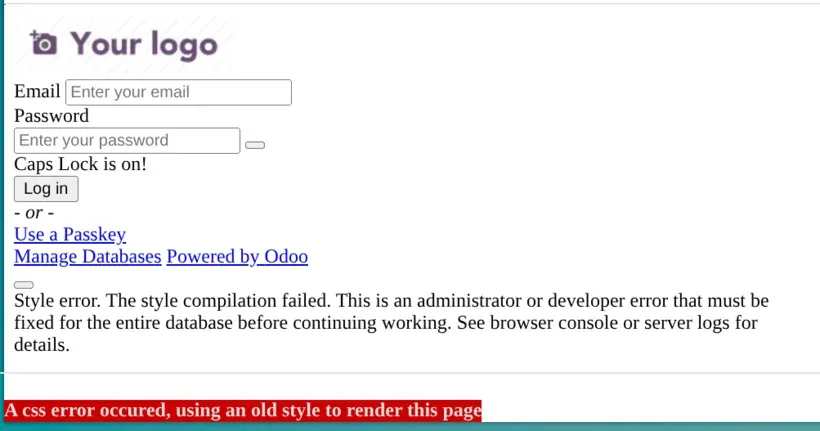
After bringing up an Odoo 19 staging server, the login page rendered unstyled and the browser console showed:
Error: Undefined variable: "$black".
        on line 1472:23 of /stdin
This error occurred while compiling the bundle 'web.assets_frontend'
Odoo itself put a banner at the bottom of the page:
A css error occured, using an old style to render this page.
That banner is Odoo’s fallback: when an SCSS asset bundle fails to compile, it serves a stripped-down stylesheet instead. So the real problem wasn’t “broken CSS” — it was a bundle that wouldn’t compile.
TL;DR
The frontend SCSS bundle references $black before it’s defined. In a healthy install,
the html_editor module supplies that definition. On this server html_editor was
not installed — because it failed to load with ImportError: bs4. And bs4 failed
because the Python dependencies had been installed system-wide (with
--break-system-packages), leaving a half-broken beautifulsoup4 and an aborted
requirements.txt run. The fix was a proper virtualenv.
The investigation
1. Rule out the custom addons
The custom modules injected nothing into frontend assets and contained no SCSS. Not them.
2. Rule out the SCSS compiler
Odoo 19 compiles SCSS with libsass, pinned to 0.22.0. The server had exactly that.
Same compiler + intact core source → it should compile. So the difference had to be in
the bundle contents, not the tooling.
3. Read the bundle order
$black is used in core’s bootstrap_overridden_frontend.scss, but that file only uses
it — it never defines it. In web.assets_frontend the order is:
_assets_helpers          → (primary/secondary variables)
_assets_frontend_helpers → bootstrap_overridden_frontend.scss   ← USES $black
pre_variables.scss                                              ← DEFINES $black (too late!)
So who legitimately defines $black early enough? Grepping the codebase, the answer was
html_editor:
# html_editor/__manifest__.py
'web._assets_frontend_helpers': [
    ('prepend', 'html_editor/static/src/scss/bootstrap_overridden.scss'),
],
html_editor prepends a $black definition ahead of the file that needs it. It’s
auto_install: True, so on a normal install it’s always present and the bundle compiles.
The error’s file list contained only core files — no html_editor contribution.
That was the smoking gun.
4. Check module state
Sure enough:
 html_editor | uninstalled
 mail        | uninstalled
 portal      | uninstalled
 web         | installed
5. Try to install it — and find the real root cause
A plain install attempt “succeeded silently” (its logs were being swallowed by a
misconfigured logfile). Forcing logs to the screen revealed:
CRITICAL  Couldn't load module html_editor
...
  File ".../html_editor/models/diff_utils.py", line 6, in <module>
    from bs4 import BeautifulSoup
ImportError: Could not load the module 'bs4' to patch
html_editor needs BeautifulSoup (bs4), and it couldn’t be imported — even though
pip reported it as already satisfied. The package metadata existed, but the package
was broken/partial. On top of that, re-running requirements.txt aborted midway:
ERROR: Cannot uninstall cryptography 41.0.7, RECORD file not found.
       The package was installed by debian.
That’s the classic system-Python mess: pip packages installed with
--break-system-packages colliding with apt-managed ones, leaving half-installed
dependencies and a requirements run that never completes.
Root cause
The Python dependencies were installed into the system interpreter, not an isolated environment. That left
beautifulsoup4broken →html_editorcouldn’t load →html_editorstayed uninstalled → nothing defined$blackfor the frontend bundle →web.assets_frontendfailed to compile → “old style” fallback on every page.
The fix: give Odoo its own virtualenv
A venv gives Odoo an isolated site-packages that pip fully controls — no
--break-system-packages, no apt-vs-pip conflicts, no half-installed packages.
Create the venv and install dependencies
# (example paths: service user 'odoo', home '/opt/odoo')
sudo apt install -y python3-venv python3-dev build-essential \
  libpq-dev libxml2-dev libxslt1-dev libldap2-dev libsasl2-dev \
  libjpeg-dev zlib1g-dev libffi-dev

sudo -u odoo python3 -m venv /opt/odoo/venv
sudo -u odoo /opt/odoo/venv/bin/pip install --upgrade pip wheel
sudo -u odoo /opt/odoo/venv/bin/pip install -r /opt/odoo/odoo-server/requirements.txt
Note: inside a venv you do not need
--break-system-packages— a venv isn’t an externally-managed environment, so the flag is a harmless no-op there.
Point the service at the venv
There are two service styles depending on how you installed Odoo.
Option 1 — SysV init script (/etc/init.d/<service>, as produced by the popular
Yenthe install script). Change two lines so the venv’s python is the executable and
odoo-bin becomes its first argument:
# before
DAEMON=/opt/odoo/odoo-server/odoo-bin
DAEMON_OPTS="-c $CONFIGFILE"

# after
DAEMON=/opt/odoo/venv/bin/python3
DAEMON_OPTS="/opt/odoo/odoo-server/odoo-bin -c $CONFIGFILE --logfile /var/log/odoo/odoo-server.log"
On modern Ubuntu, systemd wraps the init script automatically, so after editing run:
sudo systemctl daemon-reloadOption 2 — systemd unit (ExecStart). Point it at the venv interpreter:
ExecStart=/opt/odoo/venv/bin/python3 /opt/odoo/odoo-server/odoo-bin \
  --config /etc/odoo.conf \
  --logfile /var/log/odoo/odoo-server.log
sudo systemctl daemon-reloadInstall the module and restart
# make sure the logfile directory exists
sudo mkdir -p /var/log/odoo && sudo chown odoo: /var/log/odoo

sudo service odoo-server stop

# one-off install using the venv interpreter
sudo -u odoo /opt/odoo/venv/bin/python3 /opt/odoo/odoo-server/odoo-bin \
  -c /etc/odoo.conf -d odoo \
  -i html_editor --stop-after-init --logfile=/dev/stdout --log-level=info

sudo service odoo-server start
A clean run now shows Loading module html_editor → Modules loaded. with no
CRITICAL, the process runs under /opt/odoo/venv/bin/python3, and a hard reload of
the login page renders normally — the $black error and the “old style” banner are gone.
Lessons
- “A css error occured, using an old style to render this page” = an SCSS asset
bundle failed to compile. Reload with
?debug=assetsor read the server log for the real error. Undefined variable: $blackinweb.assets_frontendusually means a module that defines the variable (herehtml_editor) isn’t installed — not a compiler bug.- A frontend SCSS error can trace all the way back to a missing/broken Python package
blocking an
auto_installmodule from loading. - Install Odoo’s Python dependencies in a virtualenv, never system-wide with
--break-system-packages. It’s the difference betweenpipowning the environment and fightingaptover it. - If a module install looks like it “did nothing”, check your
logfilesetting — errors may be going to a file (or a directory that doesn’t exist) instead of your terminal.
Running Odoo on your own infrastructure?
Self-hosting Odoo means owning exactly this class of problem — asset bundles, Python
environments, module dependencies, and the silent failures in between. If you’d rather
not fight apt against pip at 2am, we implement and maintain Odoo for Malaysian
businesses end to end — from a clean, upgrade-safe install to the tailoring that makes it
fit. See Odoo ERP & customization in Malaysia.